Mastering Promises in JavaScript (Async, Await, Fetch Explained with Real-Life Examples)
When we start working with JavaScript seriously, one concept becomes unavoidable:
that is Promises.
If you understand Promises properly, you know well Async, Await, Fetch API, API calls, and real-world applications.
Let’s understand everything in a simple, practical way.
Why Do We Even Need Promises?
JavaScript is single-threaded.
What it means?
It means, It can do one thing at a time.
But some tasks take time (API call, file read, database query).
Example:
Ordering food (we can not get food just after ordered)
Downloading a file (we can not get our file downloaded just after click on "download button")
Fetching user data from server (again same it need some time)
These kinds of tasks take time sometime little(milliseconds) or more.
If JavaScript waits for them, the whole application will freeze.
So instead of waiting…
JavaScript says:
“You continue your work. I’ll inform you when the task is complete.”
That notification system is called a Promise.
Real Life Analogy – Ordering Pizza
Imagine you order a pizza.
You place an order.
Restaurant says: “Promise! We will deliver.”
You don’t stand there waiting.
After some time:
Pizza arrives (Resolved)
Order cancelled (Rejected)
That’s exactly how a Promise works.
What is a Promise in JavaScript?
A Promise is an object that represents:
The eventual completion (or failure) of an asynchronous operation.
It has 3 states: Pending, Fulfilled (Resolved), Rejected
How to Create a Promise (new Promise)
const myPromise = new Promise((res, rej) => {
  let success = true;

  if (success) {
    res("Task completed successfully!");
  } else {
    rej("Something went wrong!");
  }
});
Here res and rej represents resolve(Success) and reject(Error).
Using .then() and .catch()
myPromise
  .then((result) => {
    console.log(result);
  })
  .catch((error) => {
    console.log(error);
  });
.then() runs when promise is resolved
.catch() runs when promise is rejected
What If We Resolve “Turant” or Immediately?
const promise = new Promise((resolve) => {
  resolve("Resolved immediately!");
});

promise.then((data) => {
  console.log(data);
});

console.log("Hello");
Output:
Hello
Resolved immediately!
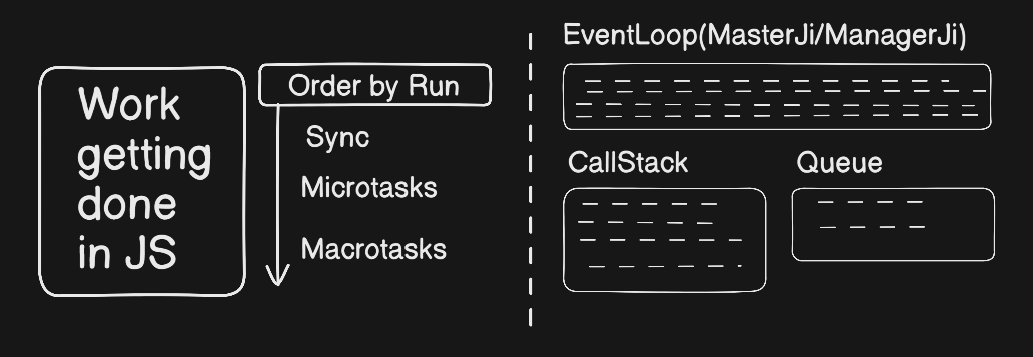
Even if we resolve immediately, JavaScript still pushes it to the microtask queue.
That’s why synchronous code runs first.
This is part of the Event Loop mechanism. Refer the below Image.
Promise Chaining
fetchData()
  .then((data) => {
    return processData(data);
  })
  .then((processed) => {
    return saveData(processed);
  })
  .catch((error) => {
    console.log(error);
  });
Each .then() returns a new Promise.
This is called Promise chaining.
Limit of .then()
Using too many .then() calls creates:
Callback-style pyramid
Hard-to-read code
Difficult debugging
Example of messy chaining:
doTask()
  .then(result1 => doSecondTask(result1))
  .then(result2 => doThirdTask(result2))
  .then(result3 => doFourthTask(result3))
  .then(result4 => console.log(result4))
  .catch(err => console.log(err));
This becomes hard to maintain.
That’s why we use Async/Await.
Async & Await (Cleaner Version of Promise)
Async/Await is just a cleaner way to write Promises.
async function handleTask() {
  try {
    const result1 = await doTask();
    const result2 = await doSecondTask(result1);
    const result3 = await doThirdTask(result2);

    console.log(result3);
  } catch (error) {
    console.log(error);
  }
}
Benefits:
Looks synchronous
Easy to read
Easy error handling
Professional code style
Fetch API + Promise
fetch() automatically returns a Promise.
fetch("https://api.freeapi.app/api/v1/public/randomusers?page=1&limit=10")
  .then(response => response.json())
  .then(data => console.log(data))
  .catch(error => console.log(error));
Using async/await:
async function getUsers() {
  try {
    const response = await fetch("https://api.freeapi.app/api/v1/public/randomusers?page=1&limit=10");
    const data = await response.json();
    console.log(data);
  } catch (error) {
    console.log(error);
  }
}
getUsers();
Behind The Scenes Important as per my thought
When you use a Promise:
It goes to Web APIs (browser).
After completion --> goes to Microtask Queue.
Event Loop checks Call Stack.
Then executes
.then()callback.
Microtasks always run before macrotasks (like setTimeout).
This is why Promise callbacks run faster than setTimeout.
Promise API Static Methods
JavaScript provides powerful static methods on the Promise object to handle multiple promises at once.
These are extremely important for real-world applications and interviews.
Let’s understand them one by one.
Promise.all(iterable),
const p1 = Promise.resolve("Pizza");
const p2 = Promise.resolve("Burger");
const p3 = Promise.resolve("Pasta");

Promise.all([p1, p2, p3])
  .then(results => {
    console.log(results);
    // ["Pizza", "Burger", "Pasta"]
  })
  .catch(error => {
    console.log(error);
  });
Waits for all promises to fulfil.
Rejects immediately if any promise fails.
Promise.allSettled(iterable)
const p1 = Promise.resolve("Success");
const p2 = Promise.reject("Failed");

Promise.allSettled([p1, p2])
  .then(results => {
    console.log(results);
  });
// Output:
[
  { status: "fulfilled", value: "Success" },
  { status: "rejected", reason: "Failed" }
]
Waits for all promises to settle (Fulfilled or Rejected)
It never fails completely.
Promise.race(iterable)
const p1 = new Promise(resolve =>
  setTimeout(() => resolve("First"), 2000)
);

const p2 = new Promise(resolve =>
  setTimeout(() => resolve("Second"), 1000)
);

Promise.race([p1, p2])
  .then(result => {
    console.log(result); // "Second"
  });
Settles as soon as the first promise settles (either resolve or reject)
Promise.any(iterable)
const p1 = Promise.reject("Error 1");
const p2 = Promise.resolve("Success!");
const p3 = Promise.reject("Error 3");

Promise.any([p1, p2, p3])
  .then(result => {
    console.log(result); // "Success!"
  })
  .catch(error => {
    console.log(error);
  });
Fulfills as soon as any promise fulfills
Rejects only if ALL promises reject
Comparison Table
| Method | Waits For | Reject Behavior | Use Case |
|---|---|---|---|
| Promise.all | All fulfilled | Fails immediately | When everything is required |
| Promise.allSettled | All settled | Never fails completely | When you want full report |
| Promise.race | First settled | May reject first | When fastest result matters |
| Promise.any | First fulfilled | Rejects if all fail | When you need at least one success |
Summary (What we read)
Promise handles async operations
Has 3 states (Pending, Fulfilled, Rejected)
.then()and.catch()handle resultAsync/Await is cleaner syntax
fetch()returns a Promise Even immediate resolve runs asynchronouslyEvent Loop plays important role
Promise API Static Methods
Final Real Life Summary
Promise is like:
“I promise I will call you when the work is done.”
Async/Await is like:
“Call me when the pizza arrives.”
JavaScript becomes easier when you try things yourself.
Thank you for reading this article.
If you found this helpful, feel free to connect with me on LinkedIn and follow my journey as I continue sharing JavaScript and frontend concepts (more blogs).
About the author
I am a Front-end Developer with 7 years of experience, started from HTML, CSS and JavaScript then switched into any UI Development again switched into React Development. Now Looking for anything like in language and started digging into that slowly.
Comments
Join the discussionNo comments yet. Be the first to comment.


