How DNS Resolution Works Step by Step

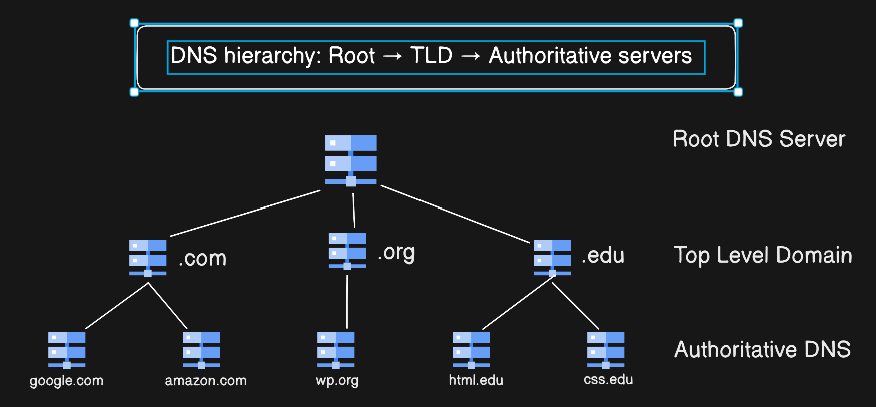
What is DNS and why name resolution exists
DNS (Domain Name System) is the internet’s phonebook.
It translates human-friendly domain names into IP addresses that computers can understand.
When you type a website name like google.com into your browser, the browser doesn’t magically know where that website lives.
Behind the scenes, a process called DNS resolution happens to convert a domain name into an IP address.
In this blog, we’ll understand how DNS resolution works step by step using the dig command, and see how root, TLD, and authoritative name servers work together.
Example: google.com → 142.250.x.x
What is the dig Command?
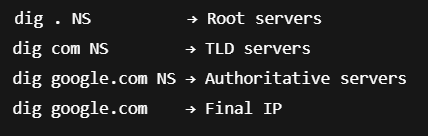
dig (Domain Information Groper) is a command-line tool used to inspect DNS records and understand how DNS resolution works.
It is commonly used by developers, system administrators, and DevOps engineers for debugging DNS issues.
dig shows you what normally happens silently in the background.
DNS Resolution Happens in Layers
DNS resolution does not happen in one step.
It happens in layers:
Root → TLD → Authoritative name servers
This layered design makes DNS:
Scalable
Distributed
Reliable
Root Name Servers (dig . NS)
dig . NS : This command shows the root name servers of the DNS system.
Root servers know where TLD servers are
They don’t know IP addresses of websites
Root servers are like the index page of a phonebook.
TLD Name Servers (dig com NS)
dig com NS : This command shows the name servers responsible for the .com top-level domain.
TLD servers know which authoritative servers manage a domain
They still don’t return IP addresses
TLD servers are like city directories.
Authoritative Name Servers (dig google.com NS)
dig google.com NS : Authoritative name servers store the actual DNS records for a domain.
These servers know A, AAAA, MX, TXT records
They provide the final answer
Authoritative servers are like the exact home address.
Full DNS Resolution (dig google.com)
dig google.com : This command shows the final DNS answer, including the IP address.
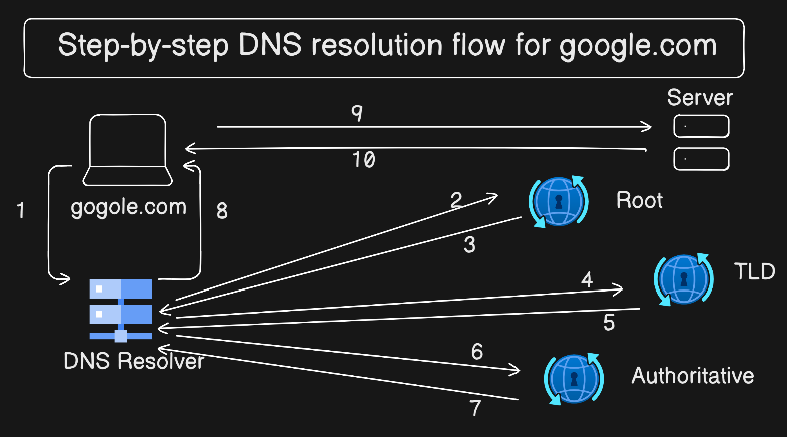
What happens internally:
Resolver asks root servers
Root refers to TLD servers
TLD refers to authoritative servers
Authoritative server returns IP address
Role of Recursive Resolvers
Your browser does not talk directly to root or TLD servers.
It talks to a recursive resolver (usually provided by your ISP or DNS provider).
Recursive resolver:
Performs all DNS lookups
Caches results
Improves performance
From Browser to Server
Browser → Recursive Resolver → Root → TLD → Authoritative → IP Address
Once the IP is known:
Browser connects to the web server
HTTP request is sent
DNS resolution happens before HTTP.
DNS resolution is a guided search through a hierarchy of name servers,
where each layer points to the next until the final answer is found.
Conclusion
DNS resolution may seem complex at first, but it becomes simple when you understand the layered approach.
Each DNS server has a specific responsibility, and tools like dig help us visualize what normally happens behind the scenes.
Once you understand DNS resolution, debugging network and production issues becomes much easier.
I hope you understand about the How DNS Resolution Works, If you would like to read about DNS Record Types. You may also connect me from LinkedIn.
Thank you for reading this article.
About the author
I am a Front-end Developer with 7 years of experience, started from HTML, CSS and JavaScript then switched into any UI Development again switched into React Development. Now Looking for anything like in language and started digging into that slowly.
Comments
Join the discussionNo comments yet. Be the first to comment.


